Defenders across the world face the burden of responding to yet another botched code-execution vulnerability, this time in boot-time firmware used by most of the world’s server vendors and data centers.
The vulnerability, with a severity rating of 9.5 out of 10, resides in the TianoCore EDK II, an open source codebase that hardware makers and cloud providers use to create the UEFI firmware that runs during the boot-up sequence. Last year, a representative of the UEFI Forum called EDK2 the "preeminent solution / implementation of the UEFI specifications." Virtually all UEFI suppliers (sometimes still called IBVs or independent BIOS vendors), including AMI, Insyde, and Phoenix, use the reference code extensively. Project Mu, Microsoft's hardened EDK2 fork, used the code containing the vulnerable component as well.
The vulnerability, tracked as CVE-2026-97631, is a memory-corruption flaw in an ICMP component that attackers can exploit to execute malicious code that runs before the operating system and firmware can implement defenses like Secure Boot, which establishes a chain of trust for all code, including the Trusted Platform Module (TPM), loaded during boot. While final payloads delivered by CVE-2026-97631 have no persistence—meaning they run only once—they can give attackers a wide opening to install other payloads that also run each time early in the boot process.
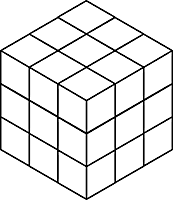
With best play on both sides, conventional tic-tac-toe (noughts and crosses) is always a draw. Played in three dimensions, though, in a 3×3×3 cube, it’s always a win for whichever player manages to take the central cell. In fact, a draw is impossible — there’s no way to fill the “board” with 14 crosses and 13 noughts without completing one or more winning paths.
What if we reverse the object so that the first player to complete such a path loses? Interestingly, in that case seizing the center cell is still the best strategy. Thereafter, whichever cell the second player chooses, the first player should take the cell diametrically opposite. Obviously this can’t create a winning triple that passes through the center, but neither can it create a triple that doesn’t pass through the center, because the second player would necessarily just have completed such a triple himself on the opposite side of the cube.
“So the first player cannot lose,” writes mathematician Solomon Golomb. “Thus, because no draws are possible on the 3×3×3 ‘board,’ he must win!”
“Not everything that can be counted counts, and not everything thatcounts can be counted.” Attributed to Albert Einstein
A few years ago, I watched the film “Moneyball.” It is about General Manager Billy Beane (played by Brad Pitt) whose Oakland Athletics shocked the baseball world in 2002 by nearly beating the New York Yankees in the American League playoffs.
Why “shocked?”
Because Beane had a player payroll costing $41 million and the Yankees had laid out $126 million in the same year for their roster yet both won 103 games that season.
According to the book of the same name published in 2003, Beane upended the conventional wisdom of evaluating players and fielded a team of under-rated athletes that won 20 straight games in the 2002 season (an American League record) before meeting the Yankees in the playoffs.
How did he do it?
Among baseball insiders, the conventional wisdom was to evaluate players for their potential by making subjective judgments that included numbers. For pitchers, their throwing speed, repertoire of pitches, and control. For an infielder or outfielder, counting how many of the basic “tools” (e.g., hitting average, running speed, fielding skills) he had. When scouts found a tool-rich player, the Athletics developed him into a star player. Then–here’s the bad news–that star would skip to another team to earn more money. The Yankees, Red Sox, and Phillies had big wallets and often bought these rising stars and in the case of the Oakland team left them with a seriously depleted team in 2001.
Cut to a scene in the film where Beane is listening to his professional scouts discuss “tools” of various ballplayers they are considering for the 2002 season. He stops the discussion and tells them that traditional ways of evaluating ballplayers won’t work for the Athletics because in a small market like Oakland, they can’t pay top prices that big market teams could. Beane tells the scouts they must think differently about evaluating ballplayers and use different metrics such as how many times a player got on base rather than batting average. He tells them that a high-priced star is a blend of several talents so look for less costly players who, together, combine those different talents into what the one super-star had. Using measures that few baseball insiders had applied, Beane and his high-tech side-kick tell these experienced scouts to identify under-valued players that met their new metrics. That is how Beane intended to build a new team for the 2002 season.
In this film scene, scouts were upset that Beane had ignored their wisdom gained from decades of experience. They knew which ballplayers were stars-in-the-rough; they didn’t have to listen to geeky analysts that Beane had hired to reel off percentages or see computer print-outs. Beane was rejecting their intuitions, experience, and “feel” for the game.
I must confess that this scene in the film showing the confrontation between professional scouts touting their traditional ways of evaluating talent and the new “business plan” of using “sabermetric” principles reminded me, almost painfully, of the those periodic policy debates over evaluating degrees of teacher effectiveness. Why “painfully?”
Professional scouts, based upon their experiences, intuitions, and insights into the game of baseball, made qualitative judgments (always including relevant statistics) about players.
Just like many researchers, teachers, and administrators, I have also argued against reducing the complexity of classroom teaching to a single number, in part or wholly, based on students’ test scores in making judgments about effectiveness and salary. Equations factoring in different aspects of teaching are now used in some districts to evaluate teachers, get rid of under-performing ones while paying bonuses to effective ones–all determined by complex algorithms.
A Statistical Model the New York City School System Uses in Calculating the Effectiveness of Teachers.Caption as printed in the New York Times, March 7, 2011.
My arguments–and here is where I winced while watching the film–reminded me of when I heard those professional scouts loudly protest Beane’s new metrics in hiring and firing decisions. Many aspects of teaching (e.g., relationships with students, inspiring them to achieve) are strongly linked to student behavior and performance. These crucial factors in classroom teaching cannot easily be captured by numbers. Note that the Albert Einstein quote at the beginning of this post challenges this sabermetric bias.
Yet some school districts have used such a “business plan” in evaluating and paying teachers. In 2010, Washington, D.C., for example, using algorithms to evaluate teachers, fired 241 teachers (about 4 percent of the district’s teacher corp) and put an additional 730 on notice that if they do not improve, they could be fired. Houston (TX) Superintendent Mike Miles did the same in Dallas (TX) 2012-2015.
Oh, by the way, Billy Beane served as the Oakland’s A’s General Manager between 1997-2015. His team made the American League playoffs in 2003 and 2006.
The standard “treacherous” probability problem is the famous Monty Hall problem. Some of the issue is translating a word problem into math terms, and a lot of it is unfamiliarity with probabilistic reasoning (most majors don’t spend a lot of time on this). I think I have found one that is even thornier: “Boy Born on Tuesday.”
I really like Peter Winkler discussion of the seemingly simple probability problem “Boy Born on Tuesday” from his Mathematical Puzzles CRC Press, 2024, pp. xix, xcii, 113-114.
Instead of stealing his thunder I’ll merely present a simplified version in terms of coin flips. I’ll have Python enumerate all the cases to get the answer here, and leave the reasoning to interested readers.
I restate the problem as:
A person flipped two independent fair (50/50 chance of heads or tails) each on a random independent uniformly chosen day of the week (7 days, Sunday through Saturday, duplicate days allowed, chosen independent of any coin flip results). If they truthfully report “I had at least one heads result on a Tuesday”, then what is the probability that both coin flips came up heads?
This is to emphasize this really is a probability problem, not a subtle biology issue (such as rates of identical twins or such).
It turns the statement is leaking information about the flip. For example it eliminates cases where they didn’t flip on any Tuesdays, and the case where they saw two tails results on a Tuesday. The leaked information means the probability of both coin flips coming up heads (conditioned on the leaded information) is not any of the simple guesses such as 0, 1/4, 1/3, 1/2, 2/3, 3/4, or 1.
This problem is considered hard by most on first exposure. It isn’t that the combinatorics that is hard here, it is the usual trap of trusting intuition over calculation when reasoning about probabilities. In this case intuition tends to be weak (the problem is a bit artificial, therefore a bit unfamiliar) and the obvious calculation is very non-informative (unappetizing case enumeration).
Here I work some warm-up problems directly in Python (such as the famous “at least one of the two is heads, what is then the probability both are heads”) and then the “Boy Born on Tuesday” problem. For more discussion I recommend Peter Winkler “Boy Born on Tuesday” from his Mathematical Puzzles CRC Press, 2024, pp. xix, xcii, 113-114 (heck, I in general very strongly recommend this wonderful book).
Does artificial intelligence help students learn? That’s a question many teachers and parents want answered, as the new educational technology is rapidly spreading in classrooms.
Normally, meta-analyses would be the right place to look, since they’re supposed to gather a scattered body of research and make sense of it by pointing to where the preponderance of evidence lies. And indeed, there are 39 of them, all reporting substantial benefits for AI in education.
But it appears that the studies synthesizing that evidence are themselves unreliable — and the peer-review process failed to catch the problems.
“This is not trustworthy evidence,” said Justin Reich, an associate professor at the Massachusetts Institute of Technology and the director of MIT’s Teaching Systems Lab, who hosted a webinar on Oct. 20 to discuss the problem of the growing number of positive AI meta-analyses. “All of these meta-analyses are flawed.”
A forensic audit of 14 of the 39 meta-analyses has found serious conceptual and statistical flaws. Appearing in journals by prominent publishers, including Springer Nature, Wiley, SAGE and Taylor & Francis, these 14 papers have accumulated more than 3,000 citations and continue to rack up 200 citations a month, according to Google Scholar — implying that AI’s effectiveness is settled science. One meta-analysis has been retracted, almost a year after its May 2025 publication in a Nature journal after two Norwegian scholars lodged a complaint.
The new audit was conducted by Patrick O’Neill, a community college professor at the Bloomington, Indiana, campus of Ivy Tech, who examined a sample of the underlying studies and the statistical methods used to combine their results in meta-analyses. O’Neill found recurring patterns of errors, some of which he said could easily have been detected just by reading the study abstracts.
During the Oct. 20 webinar, O’Neill described a constellation of “impossible statistics,” “hallucinated references” and “overstated conclusions.” Some of the underlying studies even cited references to papers published about generative AI before that technology was released to the public. Links to the citations sometimes led to unrelated studies.
Many of the aggregated studies didn’t even measure how much AI boosted learning. For example, nursing students who studied for three hours a week with an instructor using AI were compared to peers who had no study sessions at all (of course they tested better). Students who played video games and answered AI-generated questions outperformed students who did neither. In another experiment, students who chatted with an AI bot reported feeling less anxious.
Slide by Patrick O’Neill, displayed during an Oct 20 webinar.
Beth Tipton, a leading meta-analysis expert and a professor at Northwestern University, who joined her colleagues Reich and O’Neill in the critique, characterized as “crazy” the idea of conducting a very broad meta-analysis encompassing all the various uses of AI in education.
Tipton compared it to conducting a meta-analysis of math education. Is math education effective? That depends on how the math is taught. A thoughtful meta-analysis might narrow the question down to a specific approach, such as whether spatial learning interventions improve math skills. Similarly, Tipton said, how AI is used needs to be specified before conducting a meta-analysis of it.
“Do we mean people using [educational] apps and programs that include AI in them, like Khan Academy? Do we mean giving students access to Claude?” Tipton asked.
A big concern in the current batch of AI meta-analyses, O’Neill said, is “publication bias.” He found that two-thirds of the calls for papers for AI in education specifically invited research on its benefits, “seemingly disinviting null or negative results.” That means the meta-analyses are effectively “manufacturing evidence” by aggregating selected, positive results, he said.
Recrunching the numbers
O’Neill is now conducting his own AI meta-analysis, using proper statistical methods, and arriving at a far less sanguine picture. He found that the outcomes from 44 well-designed experiments varied widely, from very helpful to very harmful to students. The results averaged out to roughly zero, according to O’Neill’s preliminary calculations. This doesn’t mean educators should conclude that AI is harmless, on average. It depends on how it’s used.
Susanna Loeb, a Stanford professor of education who also joined the meta-analysis critique webinar, pointed out that her team has collected almost 900 studies on AI in education and determined that only 20 of them were of high enough quality to be included in a recent summary of the evidence for her AI Hub for Education. Her team has since identified 32 more studies and is soon to update that summary. But, she said, it’s still too early to conduct a meta-analysis that would be useful to school leaders or teachers. Very few of the high-quality studies take place in K-12 schools in the United States.
Northwestern’s Tipton worries that the fast-growing field of meta-analysis has outstripped the supply of experts qualified to review the work. More scholars are conducting meta-analyses because they’re quicker and cheaper than running experiments, and they can attract lots of citations for ambitious professors. The hunger for evidence about AI has made this topic a particular magnet for meta-analysis and spawned something of an AI meta-analysis cottage industry.
Tipton said she gets requests to review meta-analysis papers every day but can’t accept them all. Checking the underlying studies can take days, and peer review is unpaid volunteer work.
Medicine has flawed research, too, Tipton said, but it has gatekeepers to help separate the wheat from the chaff. The Food and Drug Administration evaluates evidence before approving drugs, and insurers review research when deciding which treatments to cover. Education has no comparable safeguards.
A ‘no-man’s land’
“In education, it’s kind of no-man’s land,” Tipton said. “Anybody can sort of say that they have evidence for anything, and share it with anybody, and consumers, schools, teachers, parents are left to try to wade through that and make sense of it. It’s incredibly frustrating.”
The researchers appealed to philanthropic funders and the National Science Foundation for help supporting rigorous, reliable research syntheses. “Maybe our model of voluntary peer review doesn’t work very well for landmark” studies on critical topics in education, Reich said. “Peer review’s not working. Meta-analysis is not working.”
Until truly reliable evidence emerges, the researchers advised educators to experiment cautiously with AI, starting with small groups of students and monitoring the results. Even introducing AI into a 300-student lecture course could be risky, O’Neill said.
In other words, teachers are on their own to experiment in their own classrooms. Still, it’s encouraging to see education researchers calling out flaws in their own field and trying to fix them.
Contact staff writer Jill Barshay at 212-678-3595, jillbarshay.35 on Signal, or barshay@hechingerreport.org.
Programming note: I’ve been invited to speak to the Critical Studies on AI and Education Network on What Makes Us Human? This public lecture will take place on Friday 30 October at 1pm GMT (9am US EDT) and is free to anyone who registers — you can do so here.I’mgrateful to Dr. Wayne Holmes for the invitation, and I’m looking forward to exploring my new obsession with attendees.
My mental model of effective instruction
Extrinsic motivation pedagogies are well understood within the Corleone family
Begun, the Great Instructional Debates of 2026 have. Just when I thought I was out…they pull me BACK IN.
Four years ago, I left the education nonprofit organization I’d founded with a not entirely clear vision of what I wanted to do next, apart from take a break — perhaps a permanent one — from thinking about teacher preparation. But a recent podcast series, the one I’m not listening to, is already generating debate among educators on social media about various pedagogies: Direct Instruction, scripted lessons, inquiry and discovery, there is much chattering.
As such, my prior professional experience is calling me home, because these are all things I once thought a great deal about — for over a decade, I stewarded efforts to help novice teachers be better prepared to teach. And you know me, all roads lead back to cognitive science, which suggests that teachers should employ a robust “mental model” of teaching.1
But what should that mental model entail? Well, today I’m sharing mine for your reviewing pleasure. I want to underscore that this is solely my model, I no longer speak for my former organization, and what I posit below may conflict with its current perspective (though I hope not). This model is also born of my own experience as an educator, particularly in leading human-cognition-versus-AI workshops with adults over the past three years…which of course is very different from having to teach young children every day for hours a day. So my experience as an educator is limited, and there is no substitute for experience when it comes to teaching.
That said, here’s my model in four steps.
1. Have a clear learning goal.
The learning goal is what you want students to learn.
Seems obvious, right? Yet you might be surprised how often this critical first step is not deeply considered by novice educators, who are often seduced by non-learning goals, such as, “will my students find this fun?” This doesn’t mean students shouldn’t have fun, of course, but the fun should always be in service of a clearly defined thing that the teacher wants their students to learn. And always remember that effortful thinking is often mentally taxing, so some student griping is inevitable, and may even be evidence of success.
What counts as a learning goal? The range is vast. Here, I’ll just use an example from my workshops: “I want participants to come away understanding that generative AI produces output using a statistical process called autoregression, and to have a basic understanding of that process. They should be able to compare and contrast this process with human cognition, and how we connect new ideas to existing knowledge we possess in our heads.” It can be that simple.
Educators should always have clear learning goals in mind with their lessons, and sometimes they should be made explicit to learners — but not always. Whenever teachers tell me that they’re required to post a daily learning objective at the front of the room (which is often), I feel mild irritation, because sometimes educators should want students to discover — yes, discover — the learning goal through the process of the lesson.
Dan Meyer models this nicely in his classic TED talk about watching a video of a water tank being filled with water at a painfully slow rate — he deliberately creates boredom in students to “bait the hook,” such that they’ll want to use math to solve the problem he’s presented them. Put another way, they are motivated to discover the usefulness of math. Neat trick. I’ve learned a lot about good teaching over the years from Dan, as have so many others.
2. Focus on generating effortful thinking about the learning goal.
This is really the essence of effective pedagogy.
There is at least one universal cognitive truth about building knowledge — to learn something new, you have to think about that something. And thus teachers (and workshop facilitators) must consider carefully whether and how their lesson will generate the desired thinking related to the learning goal.
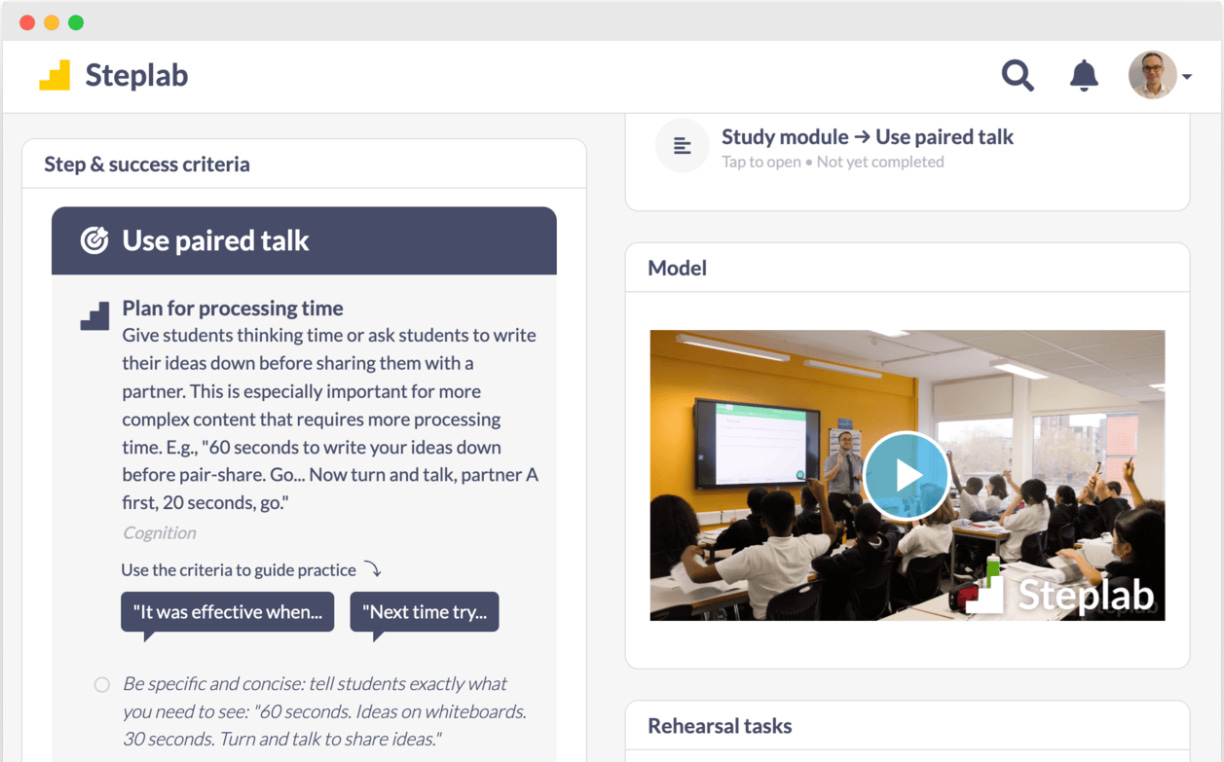
Here’s where some “scaffolding” can go a long way in helping novice teachers. Instructional Routines offer pre-built structures that have been vetted and proven useful for teaching specific content. David Wees is a veteran math educator who has a very useful compendium of such routines for specific math topics. There are other structured pedagogies that likewise can be helpful — Steplab is better known in England and Australia than the US, but many of its “steps” are well designed, in my view. At a glance:
Whether you like these particular examples or not, there is zero question that novice teachers can benefit from structured pedagogies — in fact, they often beg for these sorts of tools. More veteran teachers might benefit from using them, but as the years progress, they often develop their own routines that that have proven effective in their contexts. This is good, we don’t want to change this.
Three additional points on this topic.
First, there’s a broad range of the types of thinking an educator might want to generate in the minds of students. Dylan Kane, another veteran educator who I’ve learned so much from, illustrates this nicely. Recently, he wrote about his approach to build math fluency through use of repeated practice around simple multiplication drills — his ultimate objective being to secure these skills in long-term memory. A drive-by analysis of his teaching might call this “rote” learning, but Dylan is explicit about the “why?” of his approach, and he’s got a clear learning goal firmly in mind. What’s more, swing by Dylan’s classroom on a different day, and you might find students hopping up and down the stairs or playing with dominos to learn about the Fibonacci sequence, a lesson that won him a prestigious national math award.
Different goals lead to to different pedagogies. This is how it should be. And please note that with state-mandated, highly prescriptive lessons, not only does teacher creativity go unrewarded, it’s expressly prohibited, and perhaps even punished. No bueno.
Second, beware the danger of relying on scaffolds alone. The omnipresent risk of using an Instructional Routine or Steplab step or anything similar is that the teacher may think it’s sufficient unto itself for learning. As I argued recently, this video of Mr. Raichura employing direct instruction techniques illustrates the danger in over-indexing on the surface features of teaching — it’s possible that students were learning the core content here, but it’s alsopossible they were just playing along with the various routines, and not really thinking about anything meaningful. Routines and scaffolds are not sufficient to ensure effortful thinking by students, and they may even be deceptive if teachers start to think that orderly classrooms are the primary end-goal. (Many “No Excuses” charter schools made, and perhaps still make, this mistake.)
Third, perhaps you see why I’m hostile to using AI for lesson planning? Teachers must think about the “why?” of their lessons — this question sits at the core of their professional judgment and expertise. Relying on a mindless tool to generate text that purportedly constitutes a “lesson plan” is generally not helpful toward that end, and I wish people in education would stop pretending otherwise. Teaching demands effortful thinking by teachers as much as it does students. Please do not automate this process.2
3. Plan for failure.
Educators must plan for what they’ll do when an activity within a lesson doesn’t work as intended.
Many years ago, Michael Pershan, another veteran educator I’ve learned so much from, wrote a long essay about “Mrs. Oublier,” a pseudonym for a real math teacher. In his essay, Pershan made a tiny side point that’s both funny and important regarding how things might go wrong when teaching. You see, Mrs. O was a fan of using “manipulatives” (physical objects) to teach math concepts, and one day she decided to give her students some beans to count with. This stressed Pershan out:3
I have been teaching 3rd and 4th Graders for many years and the idea of giving kids those little cups of beans gives me minor terrors. What if the cups spills? How early do you have to get to school to set up the beans? What if a kid eats a bean?
Teachers must imagine how things might go wrong within a lesson, and have a plan for what to do next. I structure my workshops in what I call “accordian” format, if things are humming an activity can be stretched out, but if they go sideways, I’m always ready to cut the task off and switch to something else. To be sure, this is where delivering a one-off workshop is very different from daily classroom teaching, where teachers are obligated to cover required curriculum and academic standards. I have more degrees of freedom.
Nonetheless, even in K-12 classrooms, teachers should plan for keeping things moving and having off-ramps at hand. Pershan’s model is what he calls fussy teaching:
Ask students to do less, more frequently.
Every student answers every question.
Teacher controls the pace.
Switch modes often.
Is this direct instruction? Pershan thinks so, as he explains in his recent essay contending direct instruction is actually the norm in US schools — but I’ll leave that debate for the chattering class. For me, the more interesting pedagogical conversation would explore when fussy teaching will work (or not), whether certain students will like it more or less than other forms of teaching, what problems it solves and others it creates, how many modes can realistically be planned for within a lesson, and so on. The meaty conversations around pedagogy require digging into these details. (And all schools should create more time and space for teachers to have these conversations with their colleagues.)
This is where the misguided notion of scripting lessons really starts to run aground. Even if we leave aside the demotivating aspect such an approach will have with human teachers (and we should not), as a practical matter no script can prepare you for the diverse range of things that might happen on any given day. Life is inherently unpredictable, and so too are lessons — teaching is improv theater, not a paint-by-numbers exercise.
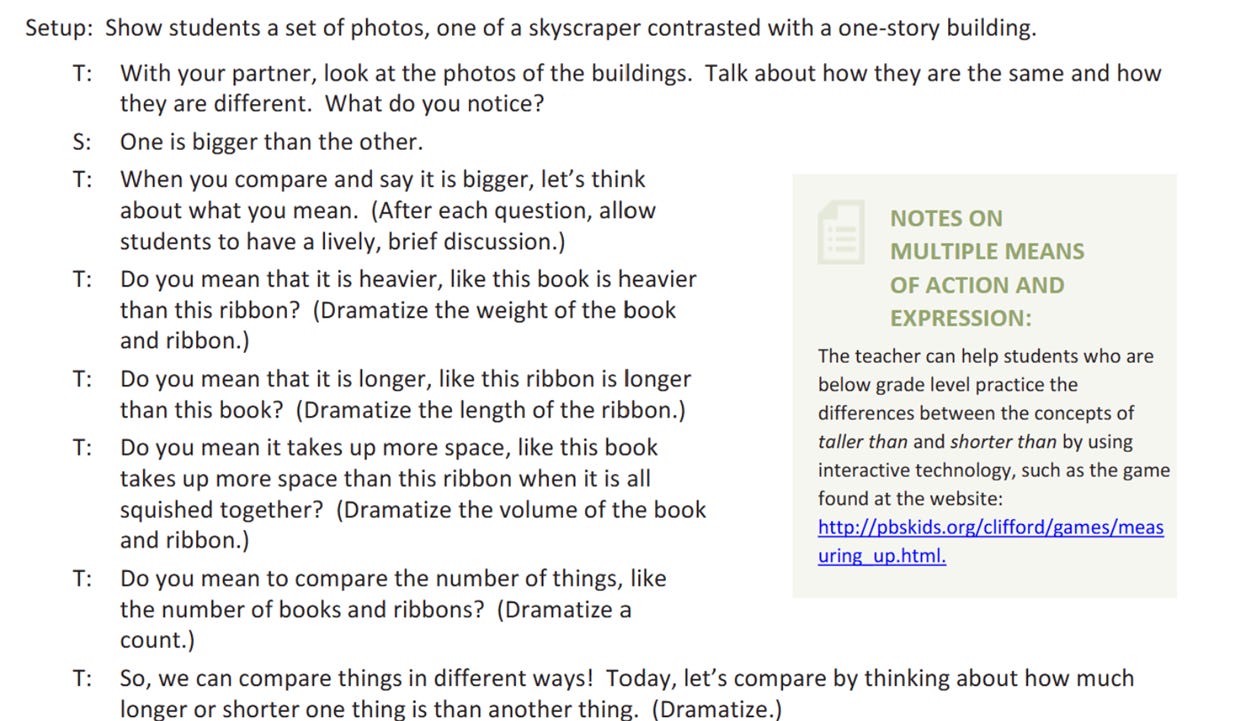
But are teachers really given scripts? Are routines and steps just scripts by another name? Yes to the former, no to the latter. To illustrate by counterexample, let’s look at this script-like lesson from EngageNY, an entity that once infuriated teachers with regularity:
Everything about this weird Platonic Form of a lesson is ludicrous — “dramatize a count,” that’s the guidance to educators? In what world will students engage in a “brief and lively discussion” comparing a skyscraper to a one-story building? Absurd. By the way, many AI-generated lessons, perhaps trained on EngageNY materials, sing in the same key as this, and they are equally useless.
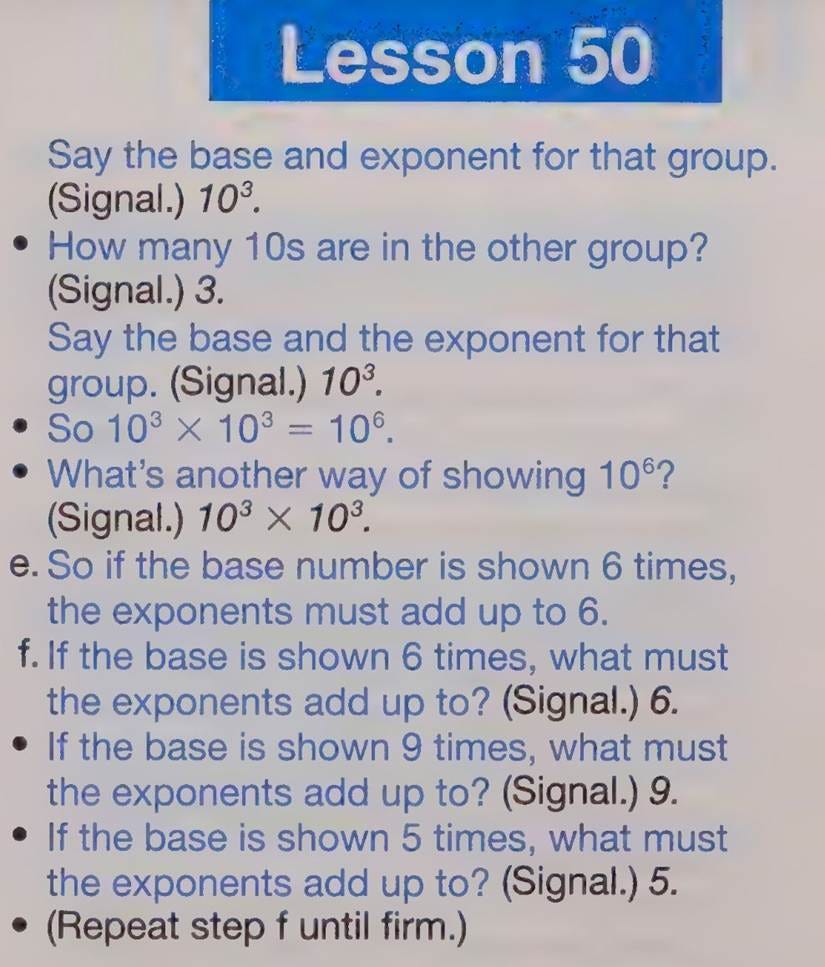
Here’s another script-like lesson from a Direct Instruction teacher’s guide, courtesy of Pershan again:
Excrement. That’s what I think of Direct Instruction Lesson 50 on bases and exponents. Rip it out, rip it out I say!
More soberly, I often reflect on a sad moment that happened early in my adult life, one that underscores the inherent unpredictability, and often heartbreaking tragedy, of any given day in the classroom. While in law school, I volunteered once a week in my first semester to “teach law” to local high school students in New Haven. One day, my student Novis, usually one of the louder kids in class, had his head down on his desk, completely disengaged — very unlike him. “Head up Novis, I need you to pay attention,” my ridiculously unprepared and ignorant self said. And that is when one of the other students motioned me over, and quietly told me that Novis’s brother had been shot and hospitalized the day prior.4
Teachers — especially those in “underserved” communities, our euphemism for the poor — face this sort of tragedy all too often. My experience with Novis, and my visits to schools in every corner of this country, informs my enduring perspective that teachers must always be ready to exercise conscious judgement based on the circumstances of any given day. Denying that is offensive to teacher professionalism, and to just being a sentient human. Humane schooling both demands and offers more than scripts can ever provide.
4. Make learning visible.
The goal is set, the task is at hand, the dangers have been considered and hopefully mitigated — we reach the fourth and final step, which is to have a plan to make student thinking explicit.
This is where education jargon such as “formative assessment” and “check for understanding” enter the picture. In every learning activity, there must be some method to obtain objective information on whether the learners actually learned anything. This can happen during the lesson, at the end of the lesson, or even further down the road, but somehow the teacher must gather empirical evidence — a fancy term for “something observable” — of how the lesson cashed out. There’s a massive amount of literature on this which I won’t survey here, but Dylan Wiliam’s website contains a treasure trove of useful resources regarding formative assessment. Likewise, Jennifer Gonzalez and her collaborators over at Cult of Pedagogy have compiled many helpful resources on assessment generally.
Two additional and perhaps controversial points on assessment.
First, I recognize that several decades of high-stakes testing for accountability purposes have left a bitter taste in the mouths of many teachers regarding testing, which is one form of assessment. I get it, and we definitely need to put an end to those policies, but we can do that while nonetheless embracing the vital role of assessment in classroom practice. This is where I break from some of my more woo teacher friends who claim they “just know” that their students learned something. Maybe they did, but maybe they didn’t, and relying solely on vibes does a disservice to the profession of teaching, and ultimately, to the obligation of ensuring students learn. Gather evidence through assessment, then reflect and revise as needed. We can be for this while also being against test-based accountability policies, our minds contain multitudes.
Second, I say this respectfully but firmly to educators in higher education: This is a massive “growth area” for many of you, which is the polite way of saying many of you don’t do this well, if at all. There’s an unfortunate assumption in higher education that the responsibility of learning largely falls to the students, that it’s on them whether they attend the lectures, do the homework, prepare for exams, etc. That’s somewhat true, but far more attention and effort must be made by professors (and their grad students) to assess whether students are learning along the way. Instead of focusing on “covering the syllabus,” efforts need to be reoriented toward assessing student learning throughout the course, not just at the end of it. Educators at universities could learn a lot from their professional K-12 colleagues about how to do this.
So that’s it, that’s my little mental model to effective instruction. There’s so much more to teaching than this, of course, but I wanted to lay my marker down in the Great Instructional Debates of 2026.
In sum, routines mostly good (especially for novice teachers), scripts always bad, avoid AI please, and remember to always think about the “why?” of the lesson. If we focus on these sorts of pedagogical questions, and eschew distracting ideological debates about hyperspecific and generally unpopular pedagogies developed in the 1960s that were “validated” by shoddy research — to pick an example at random — we might just make some headway at collectively improving teaching and learning.
“That the powerful play goes on, and you may contribute a verse.”But also:
There’s a robust debate within cognitive science on whether mental models, sometimes called mental representations, are really a thing. I’m not going to wade into that here other than to say that any sort of planning involves imagining a future state — plans may be useless, but planning is essential. As such, I find the concept of mental models very useful for teacher preparation and teaching itself.
Somewhere I picture my friend Stephen Fitzpatrick — I hope we’re still friends, Fitz! — shaking his fist at me, because he’s used AI to provide feedback on his lessons that he’s found very helpful. For me, that’s a less concerning use of AI, but he also has several decades of classroom teaching experience to evaluate the “feedback” a chatbot provides. The risk I worry about is novice teachers turning to AI before they have firm mental models of their own.
There are few things I regret more in my life than not staying in touch with Novis, he was so clever. I’ll never forget when I started lecturing about going to court, and he yelled out, “Man, everyone always talkin’ about COURT. My mom go to COURT. My dad go to COURT. When I drink milk, I drink a QUART.” Oh, how I hope he is still somewhere out there in this world, joking and laughing and thriving!
 Log in